《React 思維進化》 筆記系列
1. [React] DOM, Virtual DOM 與 React element
2. [React] 了解 JSX 與其語法、畫面渲染技巧
3. [React] 單向資料流介紹以及 component 初探
4. [React] 認識狀態管理機制 state 與畫面更新機制 reconciliation
5. [React] 在子 component 觸發父 component 資料更新、深入理解 batch update 與 updater function
6. [React] 了解 immutable state 與 immutable update 方法
7. [React] 認識 component 的生命週期、了解每次 render 都有自己版本的資料
8. [React] React 中的副作用處理、初探 useEffect
9. [React] 對 hooks 的 dependencies 誠實,以維護資料流的連動
10. [React] React 18 effect 函式執行兩次的原因及 useEffect 常見情境
11. [React] 認識 useCallback、useMemo,了解 hooks 運作原理
前言#
承接上篇 [React] 了解 immutable state 與 immutable update 方法,此篇主要敘述的是《React 思維進化》 4–1 ~ 4–3 章節的筆記,若有錯誤歡迎大家回覆告訴我~
Component 的生命週期#
「component 生命週期」準確來說是「component 實例的生命週期」,生命週期分為 Mount、Update與 Unmount。
Mount#
何時 mount? 當畫面渲染時,component 以 React element 形式在畫面中某位置新出現時,會發起 mount 流程,代表新畫面區塊的產生。
流程如下:
- 以 component function 建立一個 React element(如:
<Foo />),若 React 目前畫面結構還不存在此節點,代表這是新產生的畫面區塊,會啟動 mount - Render phase:
- 執行 component function,以 props 與 state 資料產生初始畫面的 React element
- 將產出的 React element 交給 Commit phase - Commit phase:
- 首次 render 時,瀏覽器中的實際 DOM 還沒有此 React element 對應的 DOM element,因此會將 render phase 產出的 React element 全部轉換並建立實際 DOM element
- 透過 DOM APIappendChild()將 DOM element 放到瀏覽器畫面上
- commit phase 完成後,代表畫面已「掛載」到實際瀏覽器畫面,此時可以在瀏覽器畫面找到此 component 的那些 DOM element - 執行此次 render 對應的副作用處理:執行在 component 內以
useEffect定義的 effect 函式
Update#
何時 update? 一個 component 正存在畫面中,並再次執行渲染時,又稱為「re-render」或「reconciliation」流程。
前面文章提過,呼叫 setState 方法是觸發重繪/更新的唯一手段。也有提過,component 會在以下情況被觸發 re-render(詳細請見[React] 認識狀態管理機制 state 與畫面更新機制 reconciliation):
- 作為有 state 且呼叫
setState的 component - 作為子 component,被父代以上的 component re-render 影響
- (補充)使用 context 而 context 的值發生變化時,有依賴該 context 的component 就會 re-render
不論是由哪種情況觸發 re-render,update 的流程都相同~
流程如下:
- Render phase:
- 再次執行 component function,以最新版本的 props 與 state 產出新版畫面的 React element
- 比較新版 React element 和上一次 render 的舊版 React element,找出差異處
- 將新舊 React element 的差異處交給 commit phase - Commit Phase:
- 只操作、更新新舊 React element 的差異處對應的實際 DOM element,其餘 DOM element 不動 - 清除前一次 render 時造成的副作用影響
- 執行前一次 render 版本的 cleanup 函式,以清除前一次 render 造成的副作用;也就是執行在 component 內以useEffect定義的 cleanup 函式 - 執行此次 render 對應的副作用處理:執行在 component 內以 useEffect 定義的 effect 函式
Unmount#
何時 unmount? component 類型的 React element 在 re-render 後的新畫面中不再出現時,該 component 實例進入 unmount 流程,代表該區塊不需在畫面出現。
流程如下:
- re-render 後的新畫面結構中,某 component 類型的 React element 與前一次相比不見了,則 React 判定該 component 實例應被 unmount
- 舉例:假設<Foo />這個 component 回傳的 React element 是<h1> hello React </h1>,如果在 re-render 後的新畫面中,<h1> hello React </h1>不見了,那就是<Foo />應該被 unmount - 將 component 實例對應的實際 DOM element 從瀏覽器畫面中移除
- 透過 DOM APIremoveChild()來移除畫面上的元素
(這部分書中沒特別提及,我努力找 React source code 推測的><,參考這個檔案,在 819–824 行有提到removeChild()) - 執行 component 最後一次副作用所對應的 cleanup 函式
- 在 React 內部移除對應的 component 實例,也就是移除該 fiber node,同時 component 實例內的所有 state 等狀態資料都會被丟棄
Function component 沒有提供生命週期 API#
class component 有提供各種生命週期 API,如:componentDidMount、componentDidUpdate、componentWillUnmount等,但 function component 並沒有提供生命週期的 API 給開發者使用。
需注意的是,useEffect 不是 function component 的生命週期 API,useEffect 的用途不是讓開發者在特定生命週期執行 callback 函式,詳細會在後面說明。
Function component 與 class component 的差異#
function component 已逐漸取代 class component,成為目前 React component 的主流選擇,而為何要轉用 function component、不再使用 class component 呢?因為 class component 在某些情況容易讓應用行為不如預期,產出很難被發現的 bug。
舉例來說,如果有一個可以按讚文章的 function component:
export default function LikeArticleButtonFunction(props) {  const showSuccessAlert = () => {    alert(`按讚文章「${props.articleName}」成功!`);  };
  const handleClick = () => {    setTimeout(showSuccessAlert, 3000);  };
  return <button onClick={handleClick}>按讚</button>;}
可能會以為以下的 class component 可達到相同邏輯:
import React from "react";
export default class LikeArticleButtonClass extends React.Component {  showSuccessAlert = () => {    alert(`按讚文章「${this.props.articleName}」成功!`);  };
  handleClick = () => {    setTimeout(this.showSuccessAlert, 3000);  };
  render() {    return <button onClick={this.handleClick}>按讚</button>;  }}
但其實兩者是有差異的,可以進 demo 頁測試看看:
- function component 正常運作:在「React」文章頁面點擊「按讚」後,再快速換到「JavaScript」文章頁,alert 文字會顯示「按讚文章「React」成功!」
- class component 卻運作不如預期:在「React」文章頁面點擊「按讚」後,再快速換到「JavaScript」文章頁,alert 文字會顯示「按讚文章「JavaScript」成功!」。但我們預期的是在「React」文章頁面點擊「按讚」,跳出的文章資訊應該是「React」
class component 運作不如預期是因為這段程式碼:
showSuccessAlert = () => { alert(`按讚文章「${this.props.articleName}」成功!`);};雖然 props 是 immutable 的,但 this 不是,當 class component re-render 時,React 會將新版本 props 以 mutate 方式覆蓋進 this,取代舊版 this.props 物件。因此若以非同步事件取得 this.props,可能在三秒間已經 re-render 過,三秒後拿到的 this.props 就是 re-render 過最新版本的資料,而非點下按鈕當下、舊版本的資料。
由此看出,在 class component 的非同步事件內讀取this.props,可能會破壞資料流可靠性。
那要如何解決? 那就讓非同步事件與 this 脫鉤:
import React from 'react';
export default class LikeArticleButtonClass extends React.Component {    showSuccessAlert = (articleName) => {        alert(`按讚文章「${articleName}」成功!`); //從參數中取得 articleName,而非從 this.props 取得    };
    handleClick = () => {        const { articleName } = this.props; //事件觸發當下,就先取出當下 props 的 articleName        setTimeout(() => {            this.showSuccessAlert(articleName); //透過閉包特性將 articleName 作為參數傳給 showSuccessAlert        }, 3000);    };
    render() {        return <button onClick={this.handleClick}>按讚</button>    }}
這類 class component 運作不如預期的狀況難以察覺,因為:
- 開發者在開發時習慣以
this.props與this.state操作 - 物件導向概念是基於 mutable 思維,以類別的方法來 mutate 實例屬性是物件導向常見作法
然而,這樣的開發習慣和物件導向思考模式卻與 React immutable 概念格格不入,容易導致資料流被破壞的情況。
Function component 會自動「捕捉」render 時的資料#
為何 function component 運作正常? 因為 function component 的 props 是透過參數取得,而非透過 this 這種 mutable 物件。
export default function LikeArticleButtonFunction(props) {  const showSuccessAlert = () => { //每次 render 都會產生全新的 showSuccessAlert 函式,會引用該次 render 版本的 props 資料    alert(`按讚文章「${props.articleName}」成功!`);  };
  //...}
每次 render 時,React 會從內部機制的 component 實例捕捉一次當前版本的 props,將這 props 作為參數傳給 component function 執行,而傳入的 props 與其他 render 版本的 props 彼此獨立、互不影響。
產生 event handler 並在其中使用 props 與 state 時,會因 JavaScript closure 特性,將當下 render 版本的 props 與 state 綁定在該 event handler,不論之後在何時執行此 event handler,讀到的 props 與 state 都固定不變。(文章後面會再說明這塊)
因此,class component 與 function component 的關鍵區別在於,function component 會自動「捕捉」該次 render 版本的原始資料(包含 props 與 state),並在每次 render 時,都會產生綁定該次 render 版本資料的 event handler 函式。
function component 與 class component 的差異推薦大家可以讀這篇,會更理解兩者區別:How Are Function Components Different from Classes?
每次 render 都有自己版本的 props 與 state#
來看一個常見的 Counter 範例:
export default function Counter(){    const [count, setCount] = useState(0);    const increment = () => setCount(count + 1);
return ( <div> <p>counter: {count}</p> <button onClick={increment}> +1 </button> </div> )}其中,count 只是數字型別的變數,不具監聽性質,count 並不會監聽(watch)變化並自動更新。
每次 render 執行 const [count, setCount] = useState(0); 時,React 會將最新版本的 state 值從 component 實例取出,在該次的 render 定義一個區域變數儲存該值。可將 count 視為該次 render 不變的常數,以下來看看不同次 render 的情況:
//不同次 render 版本的 component
//第一次 renderfunction Counter(){    const count = 0; //從 useState 取出的 state 值,放到 const 定義的變數,可視為該次 render 不會變的常數
    //...    <p>counter: {count}</p>    //...}
//經過事件呼叫 setState 後,re-render component functionfunction Counter(){    const count = 1; //從 useState 取出的 state 值,放到 const 定義的變數,可視為該次 render 不會變的常數。此 count 變數與上一次 render 的 count 變數是不同的變數
    //...    <p>counter: {count}</p>    //...}
可看到不同次 render 都會有一個 count 變數(也可視為常數),但 count 變數在不同次 render 間彼此獨立、互不影響,只是剛好變數命名相同~此為 JavaScript 特性,執行 component function 其實就是執行一次函式,而每次執行函式時都會產生新的執行環境、新的作用域,函式內宣告的變數與前一次函式作用域無關。
props 與 state 值同理,每次 render 時都會傳入新 props 物件作為參數,也可將 props 視為每次 render 不變的常數。
➡️ 小結:component function 執行一次 render 時,會從 component 實例捕捉 render 那瞬間的資料(props 與 state)快照,成為特定時刻的歷史資料,這些資料不會再改變。
✨ 釐清/複習一下 React 運作機制:
- React 不會監聽資料變化,開發者要透過setState告知 React 觸發 re-render
- React 不會在setState被呼叫時檢查新舊資料詳細差異,而是以Object.is()比較來決定是否繼續 reconciliation
- 一次 render 就是以當下版本的 props 與 state 重新執行一次 component function
- 每次 render 時都會捕捉到屬於自己版本的 props 與 state 作為快照,且快照永不改變
快照指的是某一時刻系統、應用或任何可變物件狀態的歷史紀錄,可捕捉特定時刻資訊。
以前文來說,「特定時刻」指「每次 render」,捕捉的資訊是「該次 render 對應的 props 與 state 資料」,捕捉後就像照相一樣,被捕捉的畫面/資料會定格成歷史,不會再改變。

每次 render 都有自己版本的 event handler#
import { useState } from 'react';
export default function Counter() {  const [count, setCount] = useState(0);
  const handleIncrementButtonClick = () => {    setCount(count + 1)  };
  const handleAlertButtonClick = () => {    setTimeout(() => {      alert(`你在 counter 的值為 ${count} 時點擊了 alert 按鈕`);    }, 3000);  };
  return (    <div>      <p>counter: {count}</p>      <button onClick={handleIncrementButtonClick}>        +1      </button>      <button onClick={handleAlertButtonClick}>        Show alert      </button>    </div>  );}

試著操作以上這段程式碼,若將 counter 數字加到 2 後再點擊 alert,並在三秒內盡快將 counter 數字加到 4,跳出的 alert 訊息仍是「你在 counter 的值為 2 時點擊了 alert 按鈕」:
為何如此? 有兩個原因導致:
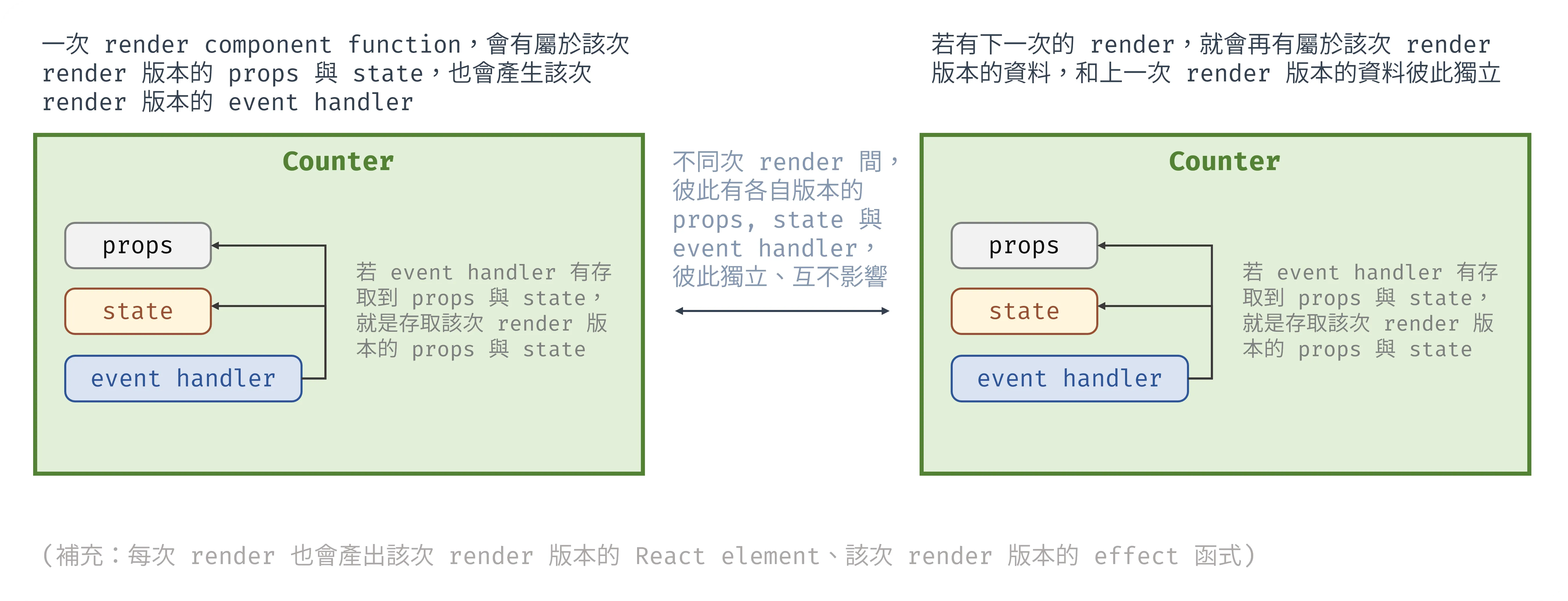
- 因為 JavaScript closure 特性,若一個函式存取其作用域外的變數,該函式會因為 closure 特性而一直記住這變數的記憶體位置,無論函式何時被呼叫,都會存取函式宣告時記住的變數
- component 每次 render 都會有屬於該次 render 版本的 props 與 state
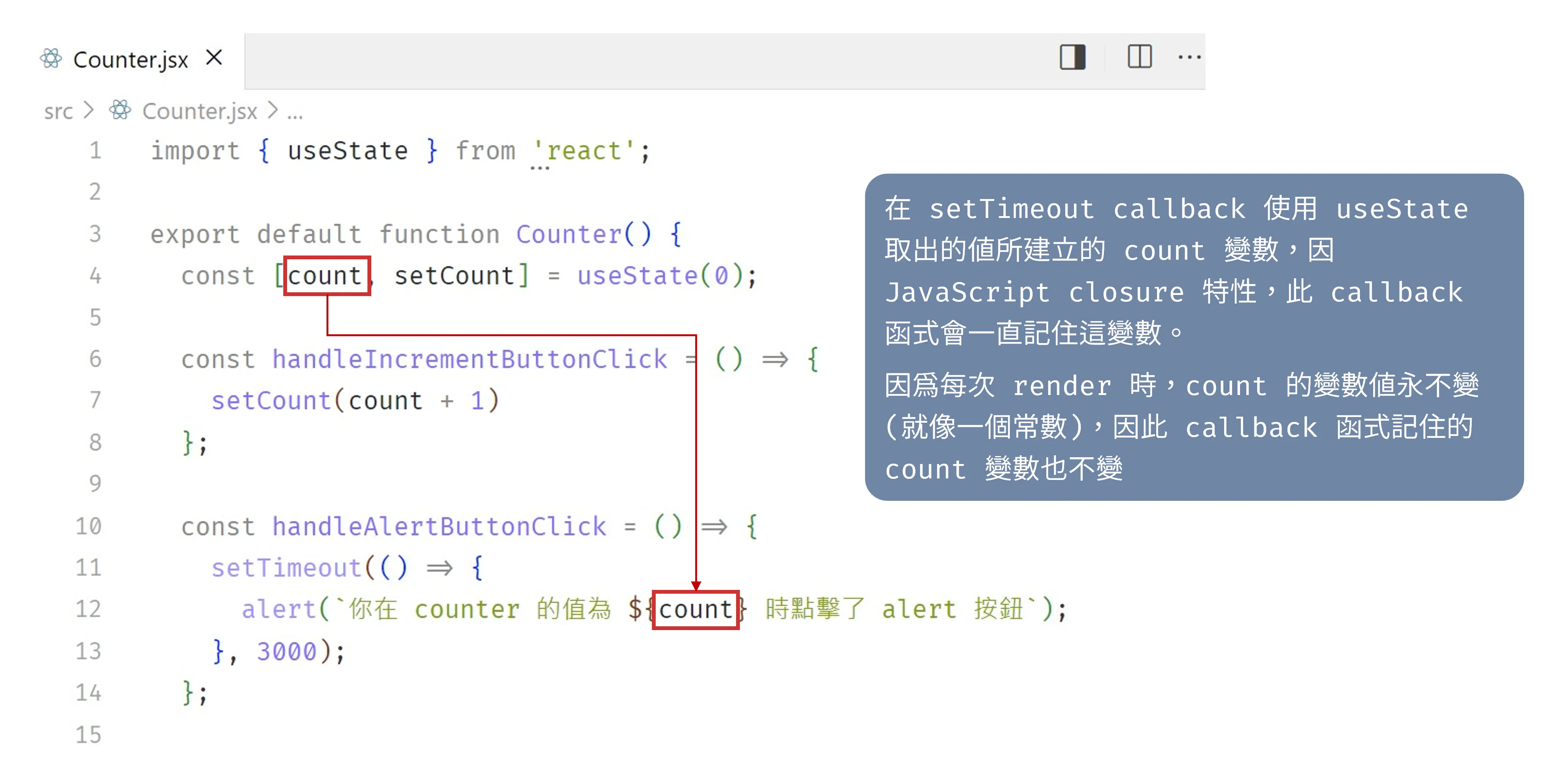
綜合兩點,當 event handler 內的 setTimeout callback 要存取 count 這個 state 值,就會因 closure 特性而一直記住 count 這變數;而每次 render 時 count 變數固定不變,所以 callback 記住的 count 變數也不變。
每次 render 的 props 與 state 彼此獨立也不相同,而每次 render 時宣告的 event handler 都會透過 closure 綁定該次 render 版本的 props 與 state,延伸來看,可視為每次 render 都會產出全新的 event handler 函式。
過程大概是這樣:
- 執行一次 render(也就是執行一次 component function)
- 擁有這次 render 版本的 props 與 state
- 宣告 event handler
- 發現 event handler 要存取 props 或 state
- 透過 closure 綁定該次 render 版本的 props 或 state 變數
- 產出屬於這次 render 版本的 event handler ,並綁定到這次 render 版本的 React element 上
- 日後不管在何時呼叫 event handler,都會因 closure 特性取到該次 render 版本的 props 或 state
示意圖如下:
回~到範例,當 state 值為 2 時,alert 按鈕上綁定的 event handler 屬於 count 值為 2 的版本,會因 closure 特性永遠記住 count 值為 2,即使 count 新增為 4 後 callback 函式才執行,它也會顯示它記住的「count 值為 2 的版本」。換句話說,在該次 render 並產出 event handler 時就決定、也已經知道會跳出什麼訊息了。
➡️ 小結:每次 render component function 時,都會
- 產生該次 render 版本的 props 與 state
- 產生該次 render 版本的 event handler,此 event handler 存取到的 props 與 state 是該次 render 版本的資料,這些資料固定不變
event handler 會記住該次 render 版本的資料,也就是過去歷史版本的資料有被存取的需求,因而我們才要保持 state 資料 immutable,以保持每一個歷史版本的原始資料彼此獨立。
而若要達到上述「function component 每次 render 都會有自己版本的資料快照、event handler、畫面」,需滿足以下元素:
- 保持資料 immutable
- closure
class component 會錯誤取得最新版本資料的關鍵原因,是因為 this 不是一種保證 immutable 的固定資料,因此無法保證在任何時候執行 showSuccessAlert 函式都會有一樣結果。
function component 可以做到則是因為每次 render 時都會重新注入新版本的 props 與 state,event handler 再透過 closure 綁定資料,產出該 render 版本的showSuccessAlert 函式。
最後,推薦大家讀這篇:A Complete Guide to useEffect,會更理解這篇文章內容~
補充:React 單向資料流連動關係
原始資料發生更新時,React 就會以當前版本的資料(props 與 state)重繪出:
- 新的 event handler 函式
- 新的畫面
- 新的 effect 函式與 cleanup 函式(之後會提到~)
Reference:#
- https://overreacted.io/how-are-function-components-different-from-classes/
- https://overreacted.io/a-complete-guide-to-useeffect/
如有任何問題歡迎聯絡、不吝指教✍️